ADLG Spreadsheet Hell
Introduction
My love of a good spreadsheet and a pretty data table has become far more widely known than I ever imagined. Recently, it led me into attempting something I don't normally do. It was true test.
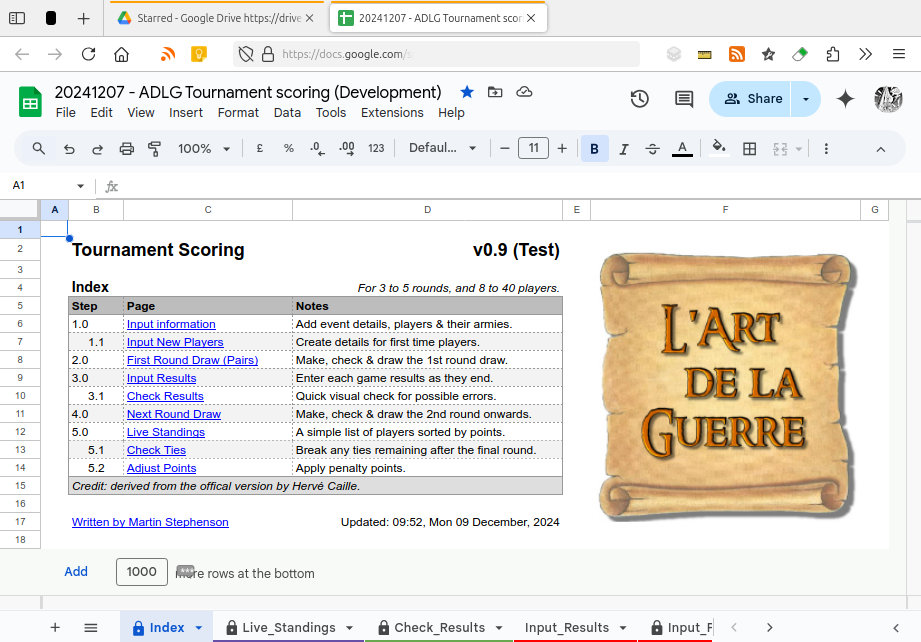
I was asked to repair a spreadsheet from a UK competition. It wouldn't pass the online tests required before its inclusion in the Art de la Guerre (ADLG) database. The organisers had cut and pasted data leading to all sorts of errors on testing.
Checking the data for a five game event with 32 players was a task and a half! I also discovered that xls files produced by non-Microsoft programs invariably fail the online tests with multiple errors, suggesting differing file headers as the source of the problem.
There but for the grace of God ...
To repair the sheet I was forced to work out how the official spreadsheet works. I also learnt how easy it is for event organisers to make simple mistakes and then struggle to correct them.
The official sheet is one form, albeit a large one. It has all the strengths and weaknesses of such an approach: simple presentation offset by complex data entry requirements.
I began to wonder if there was an easier way? So, whilst Storm Darragh made everyone miserable, I sat at my computer to see what could be done.
My approach
In developing an alternative version I wanted data entry to be as simple as possible and for it to be easy to check for errors. I also wanted to replace a complex form with simple tables.
I couldn't just re-write the whole spreadsheet from scratch: the format of the official sheet had to be retained so the data upload works. Instead, I created a data layer consisting of two pages (tabs) to sit "atop" the main page from the original spreadsheet. One to create the roster and one to enter results.
The format of the latter should match the paper results slips handed in by the players. All the organisers need do is write each player's ID on the slips before entering the data.
This simple change formed the basis of my alternative version. I then worked through the other features of the original adding them one by one. Turns out there are quite a few and things got more complicated.
Looking back, it was a lot harder than I thought. Partly due to technical reasons, but also because there's a lot involved in running and recording an event.
There's more ...
At first I planned to document all my efforts here. However, once I'd explained my design choices and written a set of instructions, it was far too long for a blog post. So I've split it into four parts. This is the first. The others are available online:
The sheet has been tested and is working well. However, I did find most users required some help until they've got used to the new sheet. For this reason, and the ever changing nature of the player database, I've decided to make the sheet available by email request only.
Technical note
The spreadsheet was created with Google Sheets and contains just one simple macro. It can't be downloaded and uses with Excel as it relies on functions unique to Google Docs. It can be used offline with Google Chrome or Microsoft Edge. Ideal for events without free Wi-Fi.
Closing remarks
This project was a perfect example of how streamlining things is never straight forward. I may have designed a better mousetrap. Then again I may not.
The new version greatly simplifies data entry, and offers ease of editing, but in return the user must handle far more pages than before. The difficulty of this transition may be a barrier to adoption; no matter how well presented the data is. The deceptive simplicity of filling in a familiar form, even with its many drawbacks, may still prove the easiest concept to grasp.
In reality, I've created the data skeleton of a dedicated application. Were I to write one, all the additional pages (features) would be tucked away in menus and the whole thing would look very neat. Sadly, programming an application is beyond me at the moment.
Never mind. Storm Darragh has passed and I can get on with other things.
Updated: 14:00, Mon 05 January, 2026